₿ How to store cryptocurrencies safe and secure?

I recommend three types of Bitcoin wallets. Two are free of charge (one for mobile phones and one for desktop computers) and are safe, but cryptocurrencies will be stored on our computers. Therefore, I recommend them for storing smaller quantities.
The other solution is recommended if you are going to store larger amounts of cryptocurrencies because that is physical storage.
I recommend these for storing smaller quantities on a mobile phone:
I prefer TrustWallet Bitcoin wallet, which is very easy to use on a mobile phone. Its operation is so simple that I do not even go into detail because the software describes all of the details step by step.
You can download the software here:
TrustWallet Bitcoin wallet
On desktop computer:
I use Exodus to store smaller amounts of cryptocurrencies because this wallet has a very safe and easy-to-use user interface. Besides that, you can perform exchanges between cryptocurrencies using Exodus.
It is safe because the private key (which provides virtually complete access to your account) is neither stored online nor in the cloud; it is only on your computer.
ATTENTION:
Your computer should be free of viruses (install an anti-virus software), have a stable operation, and the computer where you install Exodus should NOT be used by others.
Since your cryptocurrencies will be stored on your computer, if it goes wrong for any reason, you could lose them forever.
Therefore, it is very important to make backups so you can recover your cryptocurrency wallet (see details below).
Download Exodus:
Exodus
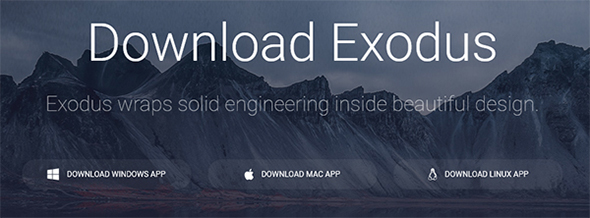
Following downloading, install to your computer.
ATTENTION:
The identifier is NOT identical to the Private Key! NEVER share the Private Key with anyone claiming that it is required to send money! IT IS NOT! If you share your Private Key with someone, then that person will own your specific crypto-wallet.
That’s all!
Now anyone can send you Bitcoins.
Now you can send and pay with Bitcoin!
Now you can exchange cryptocurrencies!
The Private Key (providing virtually complete access to your account) is neither stored online nor in the cloud; it is only on your computer. All data will be encrypted on this tool.
If you store a larger amount for a longer period of time, use "Ledger Nano S." I do not make an introduction here, because there is a video series available on their website showing its proper use.
You can order "Ledger Nano S" here:
Ledger Nano S physical cryptocurrency wallet-->>
The other solution is recommended if you are going to store larger amounts of cryptocurrencies because that is physical storage.
I recommend these for storing smaller quantities on a mobile phone:
I prefer TrustWallet Bitcoin wallet, which is very easy to use on a mobile phone. Its operation is so simple that I do not even go into detail because the software describes all of the details step by step.
You can download the software here:
TrustWallet Bitcoin wallet
On desktop computer:
I use Exodus to store smaller amounts of cryptocurrencies because this wallet has a very safe and easy-to-use user interface. Besides that, you can perform exchanges between cryptocurrencies using Exodus.
It is safe because the private key (which provides virtually complete access to your account) is neither stored online nor in the cloud; it is only on your computer.
ATTENTION:
Your computer should be free of viruses (install an anti-virus software), have a stable operation, and the computer where you install Exodus should NOT be used by others.
Since your cryptocurrencies will be stored on your computer, if it goes wrong for any reason, you could lose them forever.
Therefore, it is very important to make backups so you can recover your cryptocurrency wallet (see details below).
Download Exodus:
Exodus
Following downloading, install to your computer.
BITCOIN RECEIVING:
In order to let others send you Bitcoins, you have to provide your Bitcoin wallet ID. This is very similar to a bank account number.
ATTENTION:
The identifier is NOT identical to the Private Key! NEVER share the Private Key with anyone claiming that it is required to send money! IT IS NOT! If you share your Private Key with someone, then that person will own your specific crypto-wallet.
- Click on "Wallet," then on "Bitcoin."
-
By clicking the "Receive" button, your Bitcoin wallet ID shows up.

-
When the ID shows up, you can share it with anyone (covered in the image). This is a very long character sequence, so the system makes a copy when you click on the '+' button.

- Then you can share with the person willing to send you Bitcoins.
That’s all!
Now anyone can send you Bitcoins.
Sending Bitcoins:
-
Click on the "Wallet" then on "Bitcoin," then the "Send" button:

-
You have to provide the Bitcoin wallet ID to the person you wish to send Bitcoins to. Then click the "Send" button:
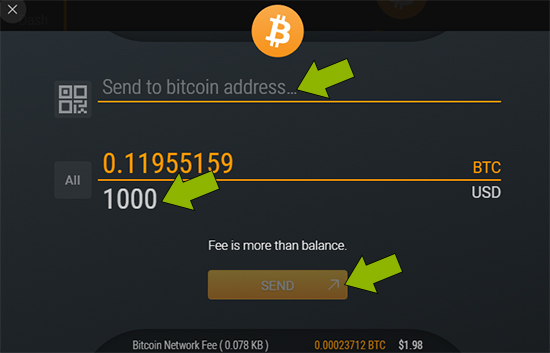
Now you can send and pay with Bitcoin!
Exchange between cryptocurrencies:
-
Click on the "Exchange" button, then set which cryptocurrency you wish to exchange to another. I exchange Bitcoin for Ethereum in the image.
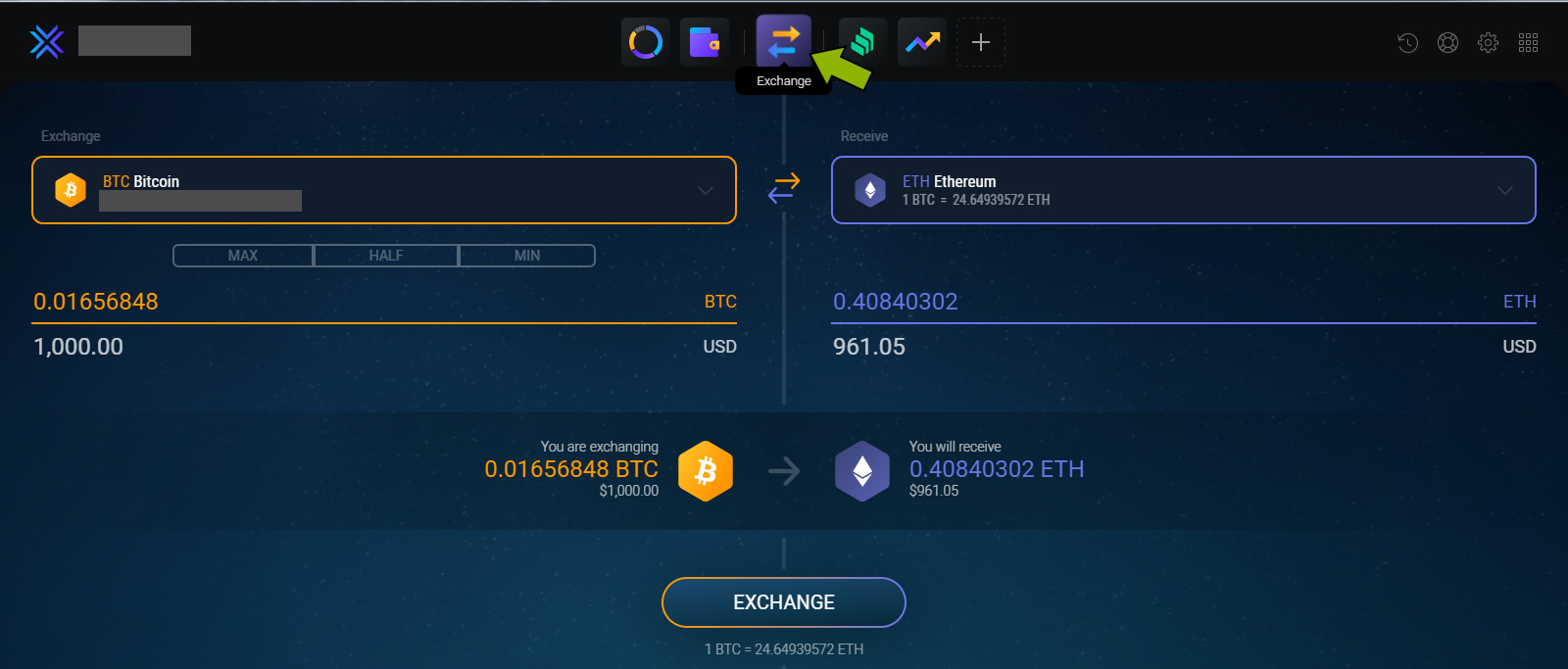
Now you can exchange cryptocurrencies!
Making a backup:
Backup is important because your cryptocurrencies will be stored on your computer, and if it goes wrong for any reason, then your money will be lost forever.
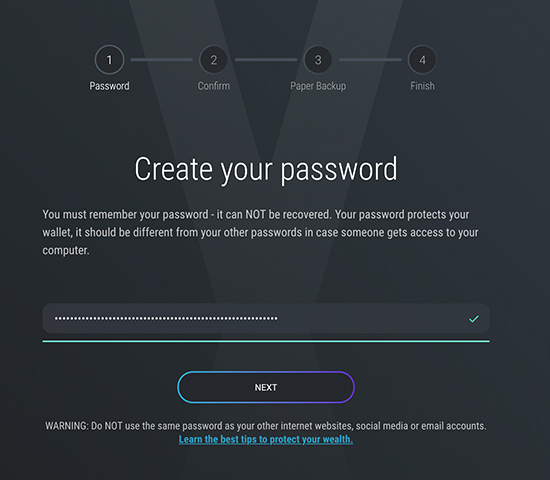
- Click on "Backup." You can make a backup if there is money in your crypto wallet.
-
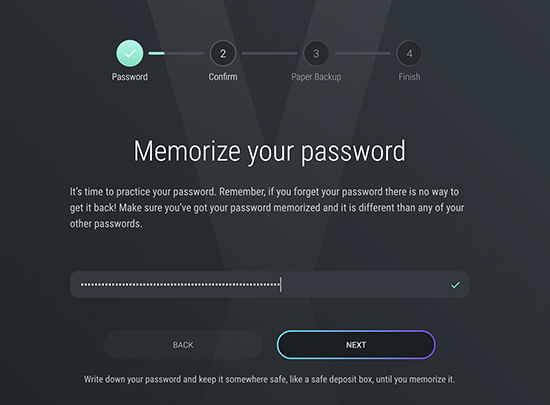
You have to provide a password, which is very important to remember!
-
Type your password again:
-
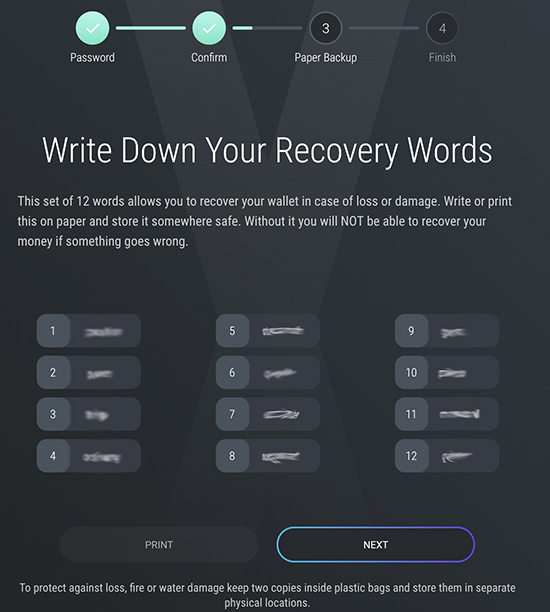
Print the 12 words, or note them in the same sequence as seen on the image. NEVER share the list with anyone!
-
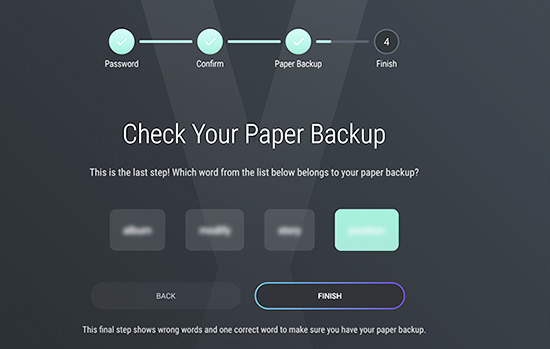
Confirm a word of your paper backup:
That’s all!
Now your backup is ready.
Now your backup is ready.
Recovery from backup using the 12 words:
-
Click on the "Restore from Backup".

-
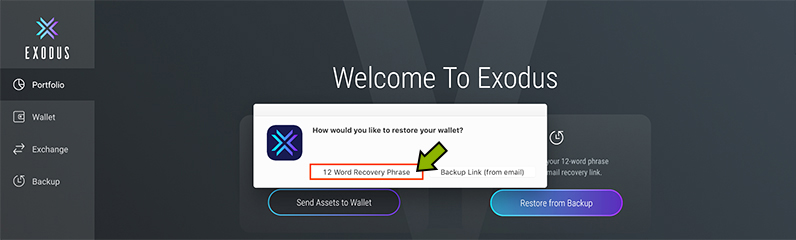
Click on the "12 Word Recovery Phrase".
-
Exodus will then ask to restart. Click on the "OK".
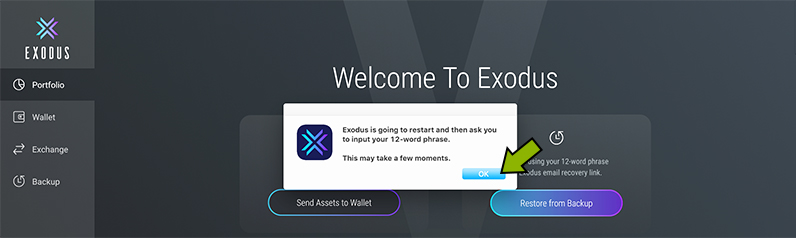
-
You have to provide the 12 words in the right sequence:
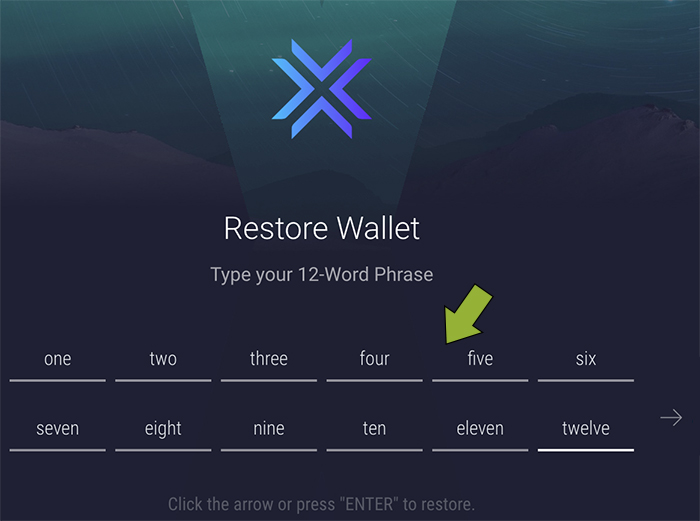
That’s all!
After a few seconds, the recovery is READY!
After a few seconds, the recovery is READY!
STORAGE OF LARGER AMOUNTS OF CRYPTOCURRENCIES:
I recommend "Ledger Nano S" to store larger amounts of cryptocurrencies, because this is physical storage. It is the most secure storage method and has won the most tests.
The Private Key (providing virtually complete access to your account) is neither stored online nor in the cloud; it is only on your computer. All data will be encrypted on this tool.
If you store a larger amount for a longer period of time, use "Ledger Nano S." I do not make an introduction here, because there is a video series available on their website showing its proper use.
You can order "Ledger Nano S" here:
Ledger Nano S physical cryptocurrency wallet-->>
Basic Training Materials
- ₿ DCA (Dollar-Cost Averaging) Strategy ₿ How to store cryptocurrencies safe & secure? ₿ Scam! Warning! 4 things that are crypto scams! ₿ "Bitcoin will be a bigger thing than internet, the iron age and the renaissance. Even greater than the industrial revolution." ₿ Watch what the richest businessmen of the world say about Bitcoin. ₿ It is You on the image, but which one? 📈 CRYPTOULTIMATUM - 'Auto-Copy Crypto Trading and Futures Signals' SERVICE. 📈 Frequently Asked Questions About the Cryptoultimatum - Auto-copy Crypto Trading and Futures Crypto Signals Service.
New content
- 📈 Frequently Asked Questions About the Cryptoultimatum - Auto-copy Crypto Trading and Futures Crypto Signals Service.📈 CRYPTOULTIMATUM - 'Auto-Copy Crypto Trading and Futures Signals' SERVICE.₿ It is You on the image, but which one?₿ Watch what the richest businessmen of the world say about Bitcoin.₿ "Bitcoin will be a bigger thing than internet, the iron age and the renaissance. Even greater than the industrial revolution."₿ Scam! Warning! 4 things that are crypto scams!₿ How to store cryptocurrencies safe and secure?₿ DCA (Dollar-Cost Averaging) Strategy.
Tags
autocopyfaq(1)
autocopytrading(1)
believeinyourself(1)
bewareofscams(1)
beyondtheinternet(1)
billionairesandbitcoin(1)
bitcoininsights(1)
bitcoinrevolution(1)
businessleadersoncrypto(1)
cryptoawareness(1)
cryptobackup(1)
cryptoeducation(1)
cryptofuture(1)
cryptohelp(1)
cryptoinvesting(1)
cryptojourney(1)
cryptoprofits(1)
cryptoquestions(1)
cryptoscams(1)
cryptosecurity(1)
cryptoservicefaq(1)
cryptosignals(1)
cryptosignalsservice(1)
cryptostrategy(1)
cryptotools(1)
cryptotradingfaq(1)
cryptotrends(1)
cryptoultimatumsignalfaq(1)
cryptoupdates(1)
cryptoviews(1)
dcainvesting(1)
digitalassets(1)
digitalgold(1)
digitaltrading(1)
dollarcostaveraging(1)
dreambig(1)
economicforecast(1)
economicrenaissance(1)
fakeicos(1)
financialgiants(1)
financialplanning(1)
futuressignalsfaq(1)
futurestrading(1)
goalsetting(1)
hardwarewallet(1)
industrialdisruption(1)
investmentfraud(1)
investmentstrategy(1)
keeppushing(1)
learncryptotrading(1)
multisiwallet(1)
nevergiveup(1)
newageofbitcoin(1)
overcomechallenges(1)
passiveinvesting(1)
persistencepays(1)
phishingawareness(1)
phishingscams(1)
ponzicrypto(1)
safecrypto(1)
scamalert(1)
secureyourcrypto(1)
smartinvesting(1)
staythecourse(1)
successmindset(1)
techevolution(1)
topceosonbitcoin(1)
tradecrypto(1)
twofactorauthentication(1)
wealthbuilding(1)
autocopytrading(1)
believeinyourself(1)
bewareofscams(1)
beyondtheinternet(1)
billionairesandbitcoin(1)
bitcoininsights(1)
bitcoinrevolution(1)
businessleadersoncrypto(1)
cryptoawareness(1)
cryptobackup(1)
cryptoeducation(1)
cryptofuture(1)
cryptohelp(1)
cryptoinvesting(1)
cryptojourney(1)
cryptoprofits(1)
cryptoquestions(1)
cryptoscams(1)
cryptosecurity(1)
cryptoservicefaq(1)
cryptosignals(1)
cryptosignalsservice(1)
cryptostrategy(1)
cryptotools(1)
cryptotradingfaq(1)
cryptotrends(1)
cryptoultimatumsignalfaq(1)
cryptoupdates(1)
cryptoviews(1)
dcainvesting(1)
digitalassets(1)
digitalgold(1)
digitaltrading(1)
dollarcostaveraging(1)
dreambig(1)
economicforecast(1)
economicrenaissance(1)
fakeicos(1)
financialgiants(1)
financialplanning(1)
futuressignalsfaq(1)
futurestrading(1)
goalsetting(1)
hardwarewallet(1)
industrialdisruption(1)
investmentfraud(1)
investmentstrategy(1)
keeppushing(1)
learncryptotrading(1)
multisiwallet(1)
nevergiveup(1)
newageofbitcoin(1)
overcomechallenges(1)
passiveinvesting(1)
persistencepays(1)
phishingawareness(1)
phishingscams(1)
ponzicrypto(1)
safecrypto(1)
scamalert(1)
secureyourcrypto(1)
smartinvesting(1)
staythecourse(1)
successmindset(1)
techevolution(1)
topceosonbitcoin(1)
tradecrypto(1)
twofactorauthentication(1)
wealthbuilding(1)
Search
Archive